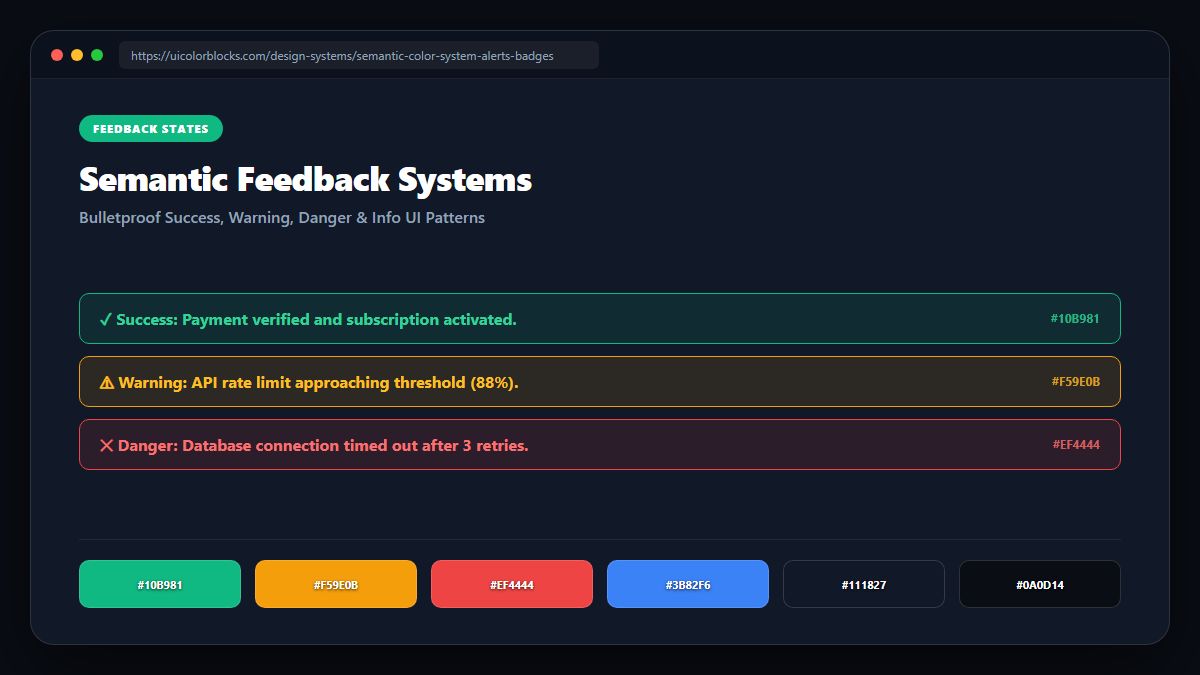
1. The Four Canonical Semantic States
Every modern design system defines four universal status roles: Success (completion and verification), Warning (caution and non-fatal alerts), Danger (destructive actions and system failures), and Info (neutral announcements).
/* Universal Semantic Palette Tokens */
:root {
  --status-success: #10b981;  /* Emerald: Verified pass */
  --status-warning: #f59e0b;  /* Amber: Action required */
  --status-danger:  #ef4444;  /* Red: Fatal error / delete */
  --status-info:    #3b82f6;  /* Blue: General update */

  /* Tinted Background Badges (12% Opacity) */
  --badge-success-bg: rgba(16, 185, 129, 0.12);
  --badge-warning-bg: rgba(245, 158, 11, 0.12);
  --badge-danger-bg:  rgba(239, 68, 68, 0.12);
  --badge-info-bg:    rgba(59, 130, 246, 0.12);
}
2. The Danger of Over-Saturation in Banner Notifications
Older web applications used full-saturation solid red backgrounds for error banners. Full-bleed saturated alert boxes shock the user and obscure the error copy. Modern interfaces use 10% tinted background pills with high-contrast text and a left-aligned 4px accent border.
| State | Badge BG | Border Color | Text Color (WCAG AA) |
|---|---|---|---|
| Success | rgba(16,185,129,0.12) | #10b981 | #065f46 (7.4:1 AAA) |
| Warning | rgba(245,158,11,0.12) | #f59e0b | #92400e (6.8:1 AA) |
| Danger | rgba(239,68,68,0.12) | #ef4444 | #991b1b (8.2:1 AAA) |
| Info | rgba(59,130,246,0.12) | #3b82f6 | #1e40af (8.9:1 AAA) |
3. Always Pair Semantic Colors with SVG Glyphs
To guarantee compliance with accessibility guidelines and support users with color vision deficiencies, never rely on color alone. Always pair Success with a checkmark, Warning with a triangle exclamation, and Danger with an octagonal stop icon.
4. Summary Guidelines for Status Indicators
Keep semantic tokens completely independent of brand marketing colors. Test all four semantic states across light and dark themes using our Contrast Checker.
5. Implementation Blueprint & Token Architecture
Translating theoretical color principles into production code requires consistent design token binding. When engineers hardcode ad-hoc hexadecimal values directly inside component CSS classes, theme parity breaks down and maintaining accessibility becomes an ongoing liability. By adopting disciplined semantic variables, your frontend application can swap themes, adapt to high-contrast operating system preferences, and enforce strict accessibility thresholds across every viewport.
When architecting your color tokens, establish an invariant rule: UI components must consume semantic tokens rather than raw primitives. This abstraction layer ensures that updating your brand identity or adjusting dark mode surface elevations requires changing values in a single centralized design token stylesheet rather than executing search-and-replace across thousands of individual CSS or JSX files.
/* Centralized Design Token Integration Blueprint */
:root {
  --color-canvas-base: #f8fafc;
  --color-surface-card: #ffffff;
  --color-border-subtle: rgba(0, 0, 0, 0.08);
  --color-text-primary: #0f172a;
  --color-text-muted: #64748b;
  --color-interactive-primary: var(--brand-500);
  --color-interactive-hover: var(--brand-600);
}

[data-theme="dark"] {
  --color-canvas-base: #080810;
  --color-surface-card: #16162a;
  --color-border-subtle: rgba(255, 255, 255, 0.08);
  --color-text-primary: #f0f0fa;
  --color-text-muted: #a0a0c0;
  --color-interactive-primary: var(--brand-400);
  --color-interactive-hover: var(--brand-500);
}
For frontend engineering teams using modern utility-first CSS frameworks like Tailwind CSS, export your verified semantic tokens directly into your tailwind.config.js file. This creates autocompleted utility classes such as bg-surface-card and text-interactive-primary, ensuring developers build accessible, harmonious interfaces without leaving their editor.
Put These Tokens into Practice
Explore our interactive design tools to test contrast ratios, generate 50–950 shade steps, or discover harmonious color palettes.